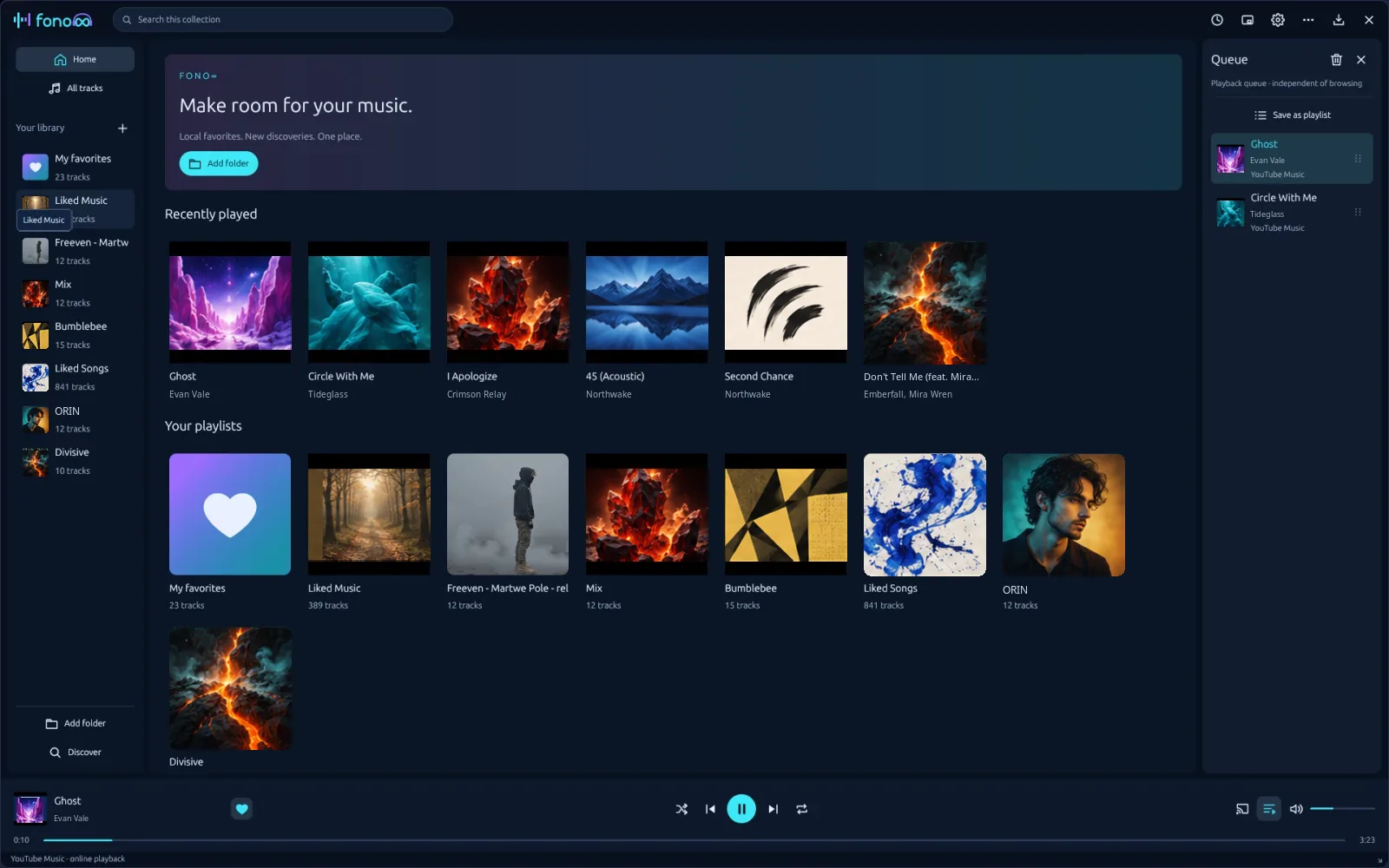
Fono8 brings music from your disk, YouTube Music and Spotify into one library and one queue, and imports your TIDAL lists. A fast native app written in Rust - free, with no ads and no tracking.
Fono8 is a non-commercial, open-source project released under the GNU General Public License v3.0 (GPL-3.0-or-later). It is developed in the open and shared with everyone on the same terms.
Free, for good
No price, no subscription, no ads, no “Pro” tier and no Fono8 account. Nothing is sold - not the app and not your data.
GPL-3.0 licence
You may use, study, modify and share Fono8. Modified versions you distribute must stay under the GPL and come with their source code.
Your data stays with you
No telemetry. Your library lives in a local SQLite database, sessions in the system keyring. Fono8 only talks to the services you sign in to.
Independent
Fono8 is not affiliated with Google, Spotify or TIDAL. You use your own accounts - and your own developer app keys - on each service’s terms.
Every track shows where it comes from, but plays like any other. Mix a local FLAC, a YouTube Music single and a Spotify album in one queue.
One library, one queue
Local files (MP3, FLAC, WAV, OGG, M4A/AAC, AIFF), YouTube Music and Spotify play one after another. Drag to reorder, save the queue as a playlist.
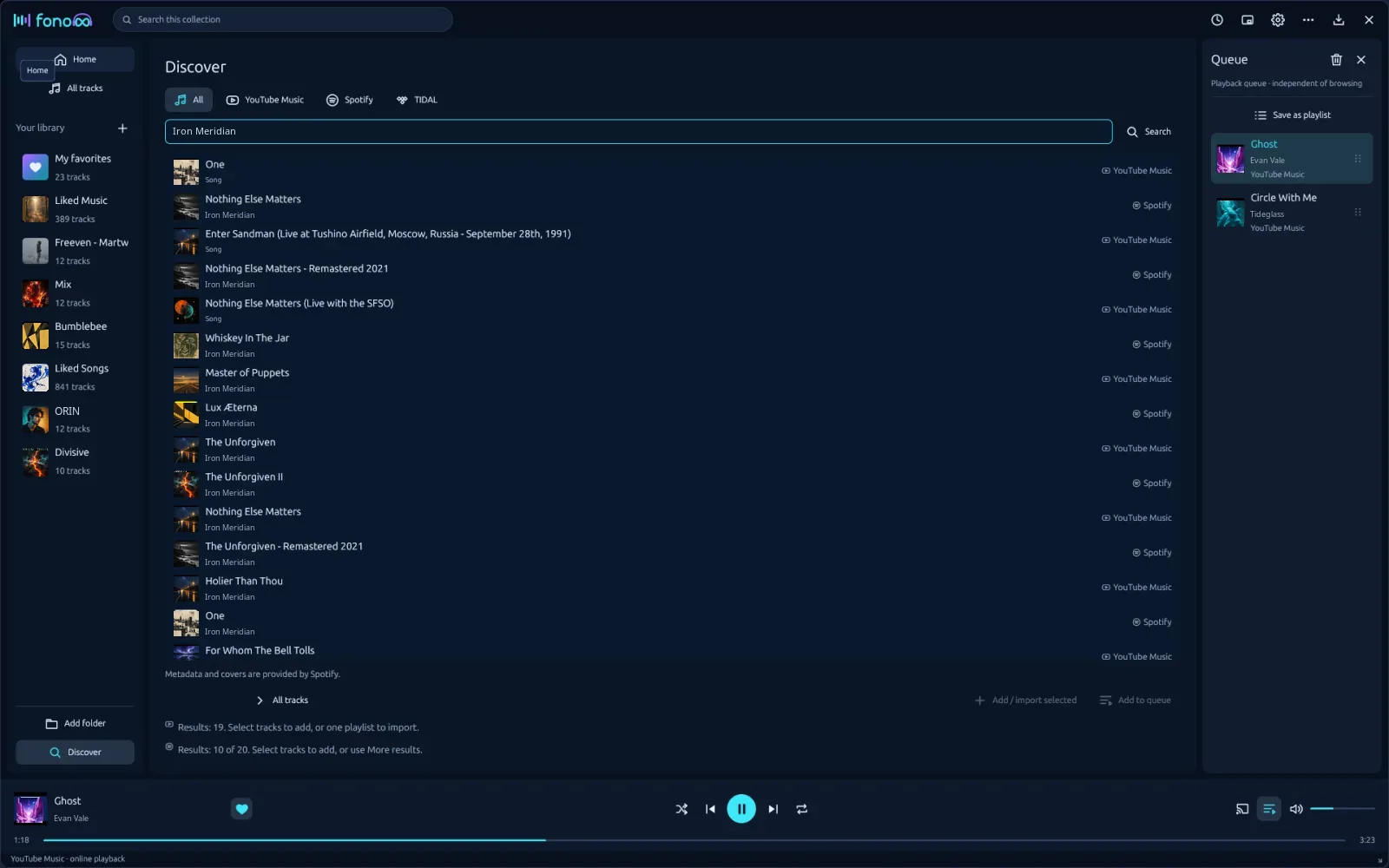
Discover
One search field queries every connected service at once with the results mixed together. Service tabs give access to your playlists, liked songs and imports from a link.
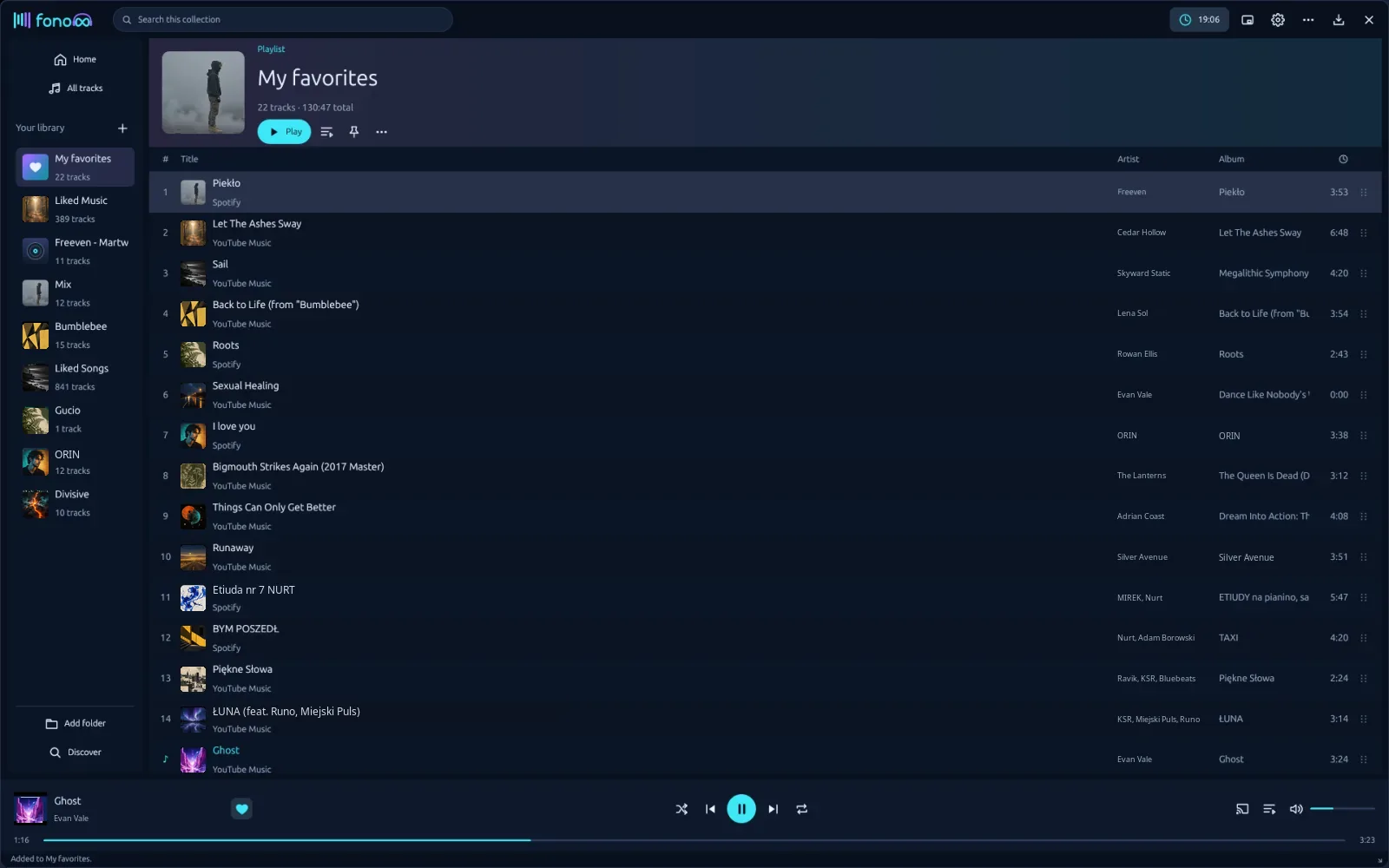
My favorites
A special playlist with a heart on the player bar that cannot be deleted by accident. Click an artist to see all their tracks or search for them in Discover.
Import from TIDAL
Favorites, albums and playlists from TIDAL become tracks matched on YouTube Music or Spotify (by ISRC), or TIDAL’s 30-second previews.
Google Cast and more
Send local music to a Nest speaker, switch to the 440×210 mini mode, set a sleep timer, control playback from the system tray or with keyboard shortcuts.
Native and light
Rust and GPUI - the UI framework of the Zed editor. Background folder scanning, tag reading, covers, M3U8 export, English and Polish interface.
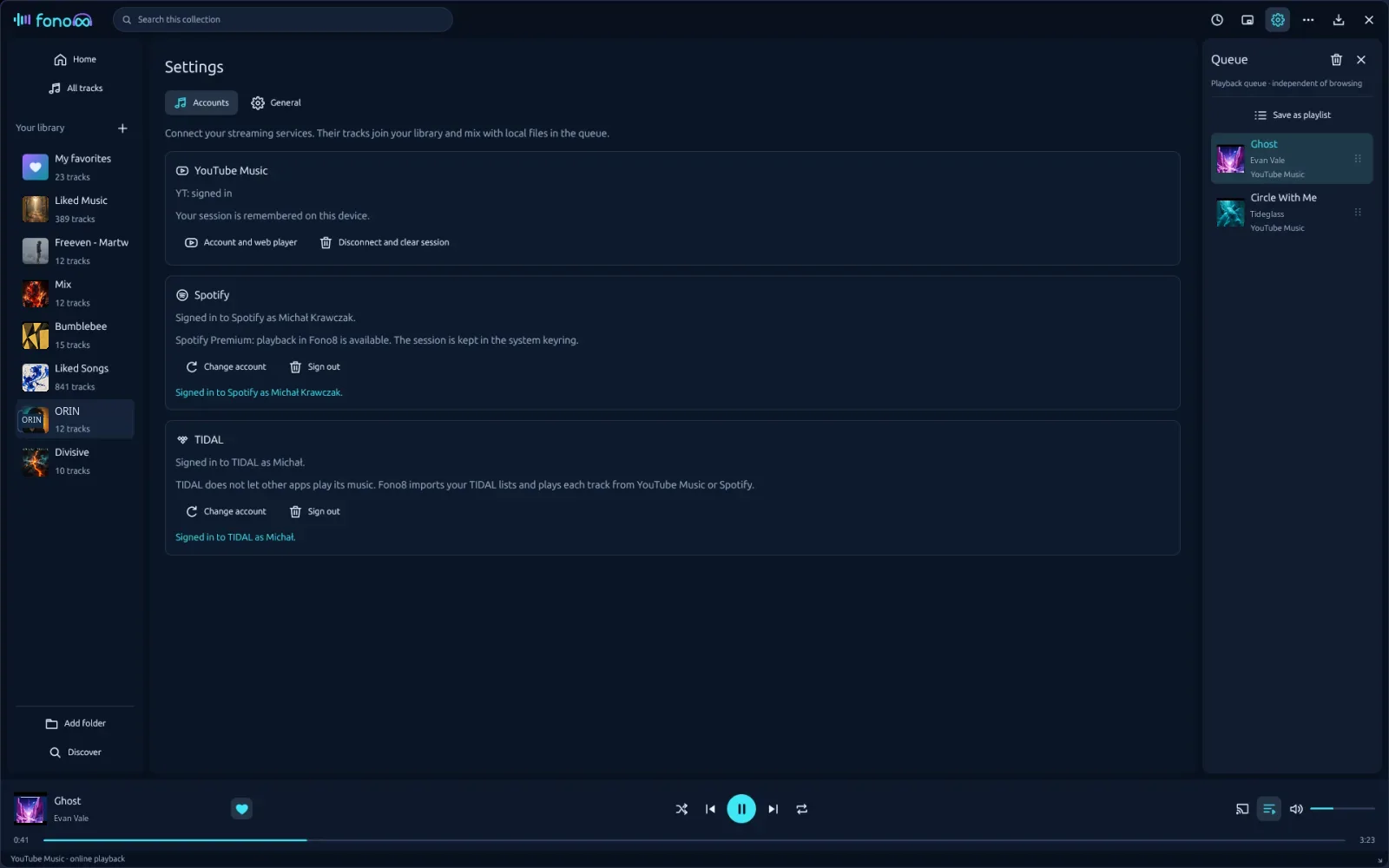
Discover - one search across all servicesMy favorites - tracks from every source in one playlistSettings → Accounts - connect your services
Installation
Install Fono8
Ready-made packages for Linux, Windows and macOS are published on GitHub Releases, each with a SHA-256 checksum. Pick your system:
On first start Fono8 adds itself to the application menu with its icon. The menu entry points to the AppImage - if you move the file, just run it once from its new place.
Requirements
x86_64, Vulkan graphics (Mesa is enough), PipeWire, PulseAudio or ALSA, xdg-desktop-portal (present on every modern desktop).
For YouTube Music (recommended): Google Chrome, Chromium, Brave or Edge - gives the full Google sign-in with security keys and passkeys. Without them Fono8 uses the system libwebkit2gtk-4.1.
For Spotify: Google Chrome, Microsoft Edge or Brave (they ship Widevine).
Optionally verify the download with the .sha256 file from the same release:
tar xzf Fono8-*-linux-x86_64.tar.gz
cd Fono8-*/
./bin/fono8
Keep fono8 and fono8-web together in bin/. The share/ directory contains a .desktop file and icons if you want to add Fono8 to your menu yourself.
Requirements
x86_64, Vulkan graphics (Mesa is enough), PipeWire, PulseAudio or ALSA, xdg-desktop-portal (present on every modern desktop).
For YouTube Music (recommended): Google Chrome, Chromium, Brave or Edge - gives the full Google sign-in with security keys and passkeys. Without them Fono8 uses the system libwebkit2gtk-4.1.
For Spotify: Google Chrome, Microsoft Edge or Brave (they ship Widevine).
Extract the whole ZIP to a folder of your choice - do not run it from inside the archive.
Run Fono8\fono8.exe. The fono8-web.exe file must stay next to it.
YouTube Music uses Microsoft Edge WebView2, which is built into Windows 11 and installed on up-to-date Windows 10.
Before you start
The executable is not code-signed, so Windows SmartScreen may warn you - choose More info → Run anyway.
Spotify playback does not work on Windows yet; the other features do.
macOS 12+ (Apple Silicon · Intel) experimental
Download Fono8-<version>-macos-universal.dmg from the latest release. The same file works on Apple Silicon and Intel Macs.
Open the .dmg and drag Fono8 to Applications.
The app is not notarized by Apple, so macOS blocks the first start. Open System Settings → Privacy & Security and choose Open Anyway, or run this in Terminal:
The first time you look for Cast speakers, macOS asks for access to the local network. Allow it, otherwise no speakers are found.
Requirements
macOS 12 Monterey or newer, on Apple Silicon or Intel.
For YouTube Music (recommended): Google Chrome, Chromium, Brave or Edge in Applications - gives the full Google sign-in with security keys and passkeys. Without them Fono8 uses the Safari engine built into macOS.
For Spotify: Google Chrome, Microsoft Edge or Brave in Applications (they ship Widevine).
The macOS build is new and experimental. If something does not work, please report it.
Optionally verify the download with the .sha256 file from the same release:
shasum -a 256 -c Fono8-*-macos-universal.dmg.sha256
Build from source
You need Rust 1.89 or newer. On Linux you also need Vulkan (Mesa is enough), PipeWire/PulseAudio/ALSA and xdg-desktop-portal.
On macOS the Xcode Command Line Tools are enough, on Windows the Visual Studio Build Tools (MSVC); cargo build --release needs no extra packages.
Useful command-line options
fono8                              # library in ~/.local/share/fono8/
fono8 "/path/to/Music"             # scan a folder right away
fono8 --language pl|en|auto        # save the interface language
fono8 --data-dir ./output/profile  # use a different data directory
FONO8_DEBUG=1 fono8                # diagnostics on stderr
Everything happens in Settings → Accounts (the gear icon in the top bar). Fono8 has no servers of its own: you sign in directly with each service and the sessions stay on your computer.
YouTube Music experimental
Search, play and import playlists. Signing in is only needed for your own playlists.
What you need
A Google account (optional - for your playlists and account features).
Linux: preferably Google Chrome, Chromium, Brave or Edge installed (full sign-in with security keys, passkeys and phone prompts); otherwise Fono8 uses WebKitGTK.
macOS: preferably Google Chrome, Chromium, Brave or Edge installed; otherwise Fono8 uses the Safari engine built into macOS.
Windows: WebView2 (built into Windows 11).
Open Settings → Accounts and find the YouTube Music card.
Click Account and web player. A browser window with YouTube Music opens on a private profile that belongs only to Fono8. Accept Google’s consent screen.
Sign in to your Google account as usual.
Fono8 notices when you are signed in, closes the window after a few seconds and comes back. You can also close the window yourself or press Signed in, back to Fono8.
Go to Discover → YouTube Music: search, open My playlists, or paste a playlist link or ID and choose Import copy. Select results (Ctrl/Shift) and add them to the library, a playlist or the queue.
Good to know
Fono8 does not work around Google’s restrictions - Google may revoke the session at any time. If that happens, just sign in again.
Cookies, authorization headers and stream URLs never leave the browser; Fono8 only looks at cookie names to detect the sign-in.
Disconnect and clear session stops the engine and deletes the saved profile.
YouTube Music tracks cannot be sent through Google Cast yet: during a Cast session they play on this computer. We are working on it. coming soon
Spotify
Full playback in Fono8 through the official Spotify Web Playback SDK.
What you need
A Spotify Premium account.
Google Chrome, Microsoft Edge or Brave installed (they include the Widevine module Spotify needs).
Linux or macOS - Spotify playback does not work on Windows yet.
Your own (free) app in the Spotify Developer Dashboard. It takes about two minutes - see below.
Part 1 - create your Spotify app
Open the Spotify Developer Dashboard, sign in with your Spotify account and accept the developer terms if asked.
Click Create app. Name and description can be anything, e.g. “Fono8”.
In Redirect URIs add exactly this address:
http://127.0.0.1:43821/callback
In the APIs section select Web API and Web Playback SDK, accept the terms and save.
Open the app’s settings and copy the Client ID (32 characters).
Part 2 - connect in Fono8
In Fono8 open Settings → Accounts → Spotify and paste the Client ID.
Click Sign in to Spotify. Your browser opens Spotify’s consent page - accept it and return to Fono8. Change account always shows the consent page again (“Not you?”).
Go to Discover → Spotify: search, browse your playlists and liked songs, and add tracks to the library or the queue.
Good to know
A new app runs in Spotify’s development mode and serves up to 5 accounts. To use it with another Spotify account, add that account under User Management in the dashboard.
Spotify only shares playlists you own or collaborate on with such apps. To import someone else’s playlist, copy it to your own in Spotify first.
Spotify tracks cannot be sent through Google Cast yet: during a Cast session they play on this computer. We are working on it. coming soon
The Spotify session is kept in the system keyring.
TIDAL list import
TIDAL does not let third-party apps play full tracks, so Fono8 uses it as a source of lists.
Open Settings → Accounts → TIDAL, paste the Client ID and click Sign in to TIDAL. Confirm in the browser and return to Fono8.
Go to Discover → TIDAL. Pick your favorite tracks, an album or a playlist, or paste a TIDAL link.
Choose the import mode:
YouTube Music, then Spotify - search by artist and title (with a duration check), then on Spotify by ISRC;
Spotify, then YouTube Music - an exact ISRC match first;
TIDAL - 30-second previews - tracks stay TIDAL tracks and play the official preview.
Good to know
The result is an ordinary Fono8 playlist - rename it, reorder it, add local files.
Tracks that could not be matched are listed after the import.
FAQ
Frequently asked questions
Is Fono8 really free? What is the catch?
There is no catch. Fono8 is a non-commercial hobby project published under GPL-3.0. There is no paid version, no ads, no data collection and no business model. You pay only for the streaming services you already use.
Why do I need my own Spotify and TIDAL Client ID?
Fono8 has no company or server that could hold a shared key on behalf of all users. With your own developer app you connect directly with the service, on its terms, and nobody in between sees your session.
Does Fono8 send my data anywhere?
No. There is no telemetry. Fono8 talks only to the services you sign in to. The library is a local SQLite database, tokens are kept in the system keyring and the YouTube Music session in a private browser profile on your disk.
Can I download music from YouTube Music or Spotify?
No. Fono8 is a player, not a downloader. Online tracks play from the official services through their own web players; nothing is saved to disk.
How can I help?
Report bugs and ideas in GitHub Issues, send pull requests, help with translations or test the Windows and macOS builds. Every contribution is published under the same GPL-3.0 licence.
Built in the open
The whole source code is on GitHub. Read it, build it, improve it - issues and pull requests are welcome.